If you have ever moved a database from Microsoft Access into SQL Server and thought, "Well, a number is a number, right?" ... yeah, not quite. Picking the wrong data type can quietly cause rounding issues, reporting errors, and weird date behavior that you might not notice until real data starts piling up. Today we are going to make sure that does not happen by choosing the right field types from the start.
As we continue building out our customer table, this is where database design starts to get real. Text fields are easy. Numbers, currency, and dates are where precision matters. The choices you make here affect storage, calculations, compatibility with Access, and long term data accuracy. So let’s walk through the field types you are most likely to use and how to pick the right ones without overthinking it.
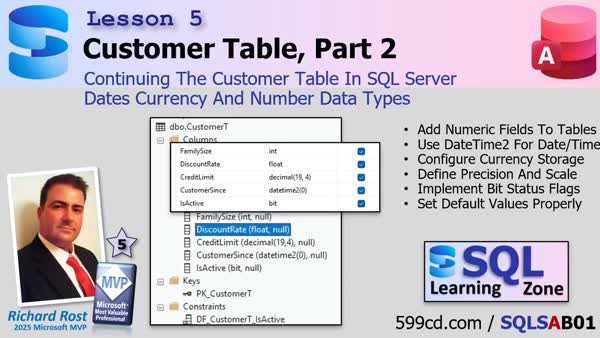
Let’s start simple. Say you have a field like FamilySize. No decimals, no fractions, just whole people. This is where you use an int data type in SQL Server. If you are coming from Access, think of this as your Long Integer equivalent. Clean, efficient, and perfect for counts.
Now let’s say you want to store something like a discount rate or measurement value. That is where float comes in. Float is the SQL Server cousin of Access Double. It is designed for approximate numeric values, especially where fractional precision is not mission critical. Percentages, rates, scientific measurements, those are all fair game.
But here is where a lot of people get into trouble. Money.
If you are storing currency values like CreditLimit, do not use float. Ever. Float stores numbers as approximate binary fractions, which means rounding errors can creep in. One transaction might round up, another down, and after thousands of transactions you end up with phantom pennies floating around your database. Fun in movies. Not fun in accounting.
Instead, use decimal. Specifically, something like decimal(19,4).
That pair of numbers matters. The first number is precision, the total digits allowed. The second is scale, the digits to the right of the decimal point. So decimal(19,4) means you can store very large numbers with four digits after the decimal. This closely mirrors how Access stores currency and makes migrations much smoother.
You might notice SQL Server has a built in money type. Yes, it exists. Yes, it works. But decimal is still the better design choice. It is more predictable, more flexible, and avoids some rounding quirks that money can introduce in calculations. When in doubt, decimal wins.
Next up, dates. Access keeps this simple with a single Date/Time field. SQL Server gives you options. If you only need the date, use date. But if you are migrating from Access, chances are you have time values mixed in. That is where datetime2 comes in.
Datetime2 is the modern replacement for the older datetime type. It offers better precision and flexibility. You will often see it written like datetime2(0). That number controls fractional second precision. A zero means no milliseconds, just standard date and time down to the second, which is perfect for most business systems.
Let’s not forget Boolean values. In Access you have Yes/No fields. In SQL Server, that becomes a bit field. One or zero. True or false.
One interesting difference behind the scenes is that Access stores True as negative one, while SQL Server stores it as one. Functionally they mean the same thing, but it is something to keep in mind if you ever inspect raw values or write cross platform logic.
Once your fields are in place, SQL Server starts organizing things a little differently than Access. Tables live inside schemas, usually dbo by default. Keys, constraints, indexes, and triggers are all treated as separate database objects rather than hidden table properties.
This is actually a good thing.
For example, constraints enforce rules directly at the server level. Required fields, default values, uniqueness, referential integrity, they all live with the data itself. That means the rules apply whether the data comes from Access, an import, or a web app. No more relying on forms or VBA alone to keep data clean.
Indexes are another big one. Think of them as performance boosters. Your primary key creates one automatically, but adding indexes to frequently searched or joined fields can turn a slow database into a warp speed one overnight.
And yes, beginners often forget to index foreign keys. I have done it myself. You will know when it happens because everything suddenly feels like it is running through molasses.
The main takeaway here is simple. Data types are not just storage containers. They directly affect calculations, compatibility, performance, and long term reliability. Choosing the right ones early saves you from painful redesigns later.
If you want to see this all built step by step inside SQL Server, the full video walkthrough is embedded above. It is worth watching just to see how these choices play out in a real table design.
Live long and prosper,
RR

No comments:
Post a Comment